Tektronix Oscilloscope & Spectrum Analyzer FAQ: What 6 Years of Mistakes Taught Me About Reliability
Posted on 2026-07-30 by Marcus Feld
-
What I’ve Learned (and Where I’ve Screwed Up) with Tektronix Gear & Calibration
-
1. Do I need to use Tektronix-branded probes with my Tektronix oscilloscope?
-
2. What’s the real deal with a Tektronix USB spectrum analyzer? Should I get one?
-
3. What does “MSO” mean on a Tektronix oscilloscope?
-
4. Is “memory depth” really that important on a modern oscilloscope?
-
5. How do I calibrate a Mitutoyo micrometer? Is it like calibrating an oscilloscope?
-
6. Should I trust the “auto setup” button on my Tektronix scope?
-
7. Is paying extra for a “rush” calibration worth it?
-
1. Do I need to use Tektronix-branded probes with my Tektronix oscilloscope?
What I’ve Learned (and Where I’ve Screwed Up) with Tektronix Gear & Calibration
If you’re reading this, chances are you’re either shopping for a Tektronix oscilloscope, trying to understand their USB spectrum analyzers, or wondering if you really need to calibrate that micrometer the same way you do your scope. I’ve been there. I’m a senior test engineer who’s handled measurement procurement and calibration scheduling for about six years now. And I’ve personally made (and documented) maybe a dozen significant mistakes, totaling roughly $8,200 in wasted budget. That includes one order of 12 probes that all had the wrong compensation range—because I assumed, didn’t verify, and the result came back: "Not suitable for your 1 GHz bandwidth application." $1,400, straight to the trash.
Take it from someone who’s burned through a budget line or two: the instrument you can trust under deadline is worth more than the one that’s 10% cheaper.
1. Do I need to use Tektronix-branded probes with my Tektronix oscilloscope?
Short answer: No, but you need to check the compensation range and bandwidth rating. I once assumed "same specifications" meant identical results across brands. Didn’t verify. Turned out a generic probe’s compensation range didn’t match my MSO’s output, causing visible overshoot on a 100 MHz clock signal. We caught it when a junior tech noticed the waveform looked “wrong.” $2,000 in rework time later, we now only use verified probes—branded or third-party with published compatibility specs. Trust me on this one: if you don’t verify, you don’t know.
General rule: If the probe has a published model number cross-reference (like Tektronix TPP1000 vs. a generic 10:1 passive), you’re probably fine. If it says “works with most scopes,” proceed with caution. (Mental note: I really should write a compatibility checklist for our lab.)
2. What’s the real deal with a Tektronix USB spectrum analyzer? Should I get one?
USB spectrum analyzers (like the Tektronix RSA series) are super convenient for field work or when your bench is already cluttered. But they’re not magic. A USB analyzer relies on your PC for processing and display, so latency can be an issue (think real-time sweeps vs. captured frames). I’ve found they work way better for band monitoring and interference hunting than for precise phase-noise measurements.
Honestly, I’m not sure why some USB models seem to have higher noise floors than their benchtop equivalents. My best guess is power supply variation and USB cable shielding. So, if you’re measuring signals near the noise floor, consider a benchtop unit. Otherwise, a USB analyzer offers a ton of portability for field diagnostics. For example, I used one to track down an intermittent 2.4 GHz interference source in a production line—saved us a week of downtime. Bottom line: good for hunting, less ideal for lab-grade certification.
3. What does “MSO” mean on a Tektronix oscilloscope?
MSO stands for Mixed Signal Oscilloscope. It means you get analog channels (usually 2 or 4) plus a set of digital channels (often 16). This is seriously useful if you’re debugging a microcontroller: you can watch the analog output from a sensor on one channel while looking at the digital I²C bus on the others.
After 5 years of managing test equipment, I’ve come to believe that an MSO is the best investment for anyone doing embedded system work—but only if you actually need the digital channels. We have a Tektronix MSO22 that handles 90% of our debug needs. The memory depth is way bigger than our older models, and the decode options (like SPI, UART) save a ton of time. If you don’t need digital, save your budget and get a pure analog scope. But if you do, the MSO’s time-correlation between analog and digital is invaluable.
4. Is “memory depth” really that important on a modern oscilloscope?
Oh, absolutely. I learned this the hard way in September 2022. I was trying to capture a rare glitch on a power rail—maybe 10 microseconds wide, occurring randomly every few seconds. With 1 Mpts of memory, the scope could only capture about 200 microseconds at high sample rate. The glitch appeared maybe twice in an hour. We upgraded to a model with 10 Mpts, and within 30 minutes we had the glitch on screen. That upgrade cost extra, but it saved roughly $3,200 in diagnostic labor over the next two months. More memory equals longer capture time equals higher probability of catching elusive events.
Spec hunters: don’t just look at bandwidth. Look at sample rate and memory depth together. A 500 MHz scope with shallow memory is less useful than a 350 MHz scope with deep memory for many real-world problems.
5. How do I calibrate a Mitutoyo micrometer? Is it like calibrating an oscilloscope?
Not exactly, but the principle is the same: you need a reference standard with known accuracy. For a micrometer (like Mitutoyo’s 293 series), calibration typically involves checking it against gauge blocks at several points across its range (e.g., 0, 25, 50 mm). You’re looking for deviation. If it’s out of spec, you might adjust the thimble or send it out.
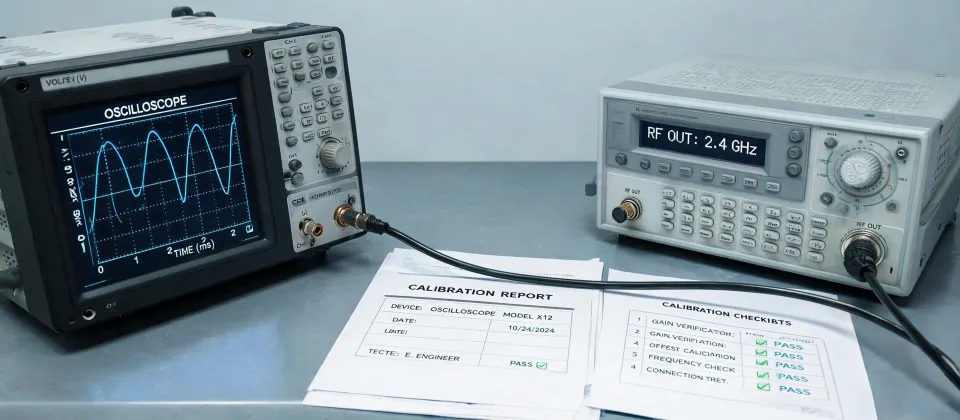
For an oscilloscope, calibration usually involves verifying vertical gain, timebase accuracy, and trigger levels against a known reference (like a calibrator). But here’s the key difference: a micrometer calibration can often be done in-house with gauge blocks (if you have access to calibrated ones). An oscilloscope calibration often requires specialized equipment and traceable standards—so most of us send them out. After the third rejection in Q1 2024 of a batch of measurements because our in-house cal wasn’t traceable, we switched to a certified lab for all high-precision tools. Bottom line: trust the lab for scopes, but you can do on-site “verification” for micrometers with gauge blocks.
And honestly? If you’re using a 24 digital caliper (like a Mitutoyo Absolute), the same logic applies. I once ordered 24 calipers for a new production line and assumed they were factory-calibrated. They weren’t. $1,200 worth of instruments needed recalibration before we could use them. (Ugh.)
6. Should I trust the “auto setup” button on my Tektronix scope?
It’s a great starting point, but I’ve been burned by total trust. Auto setup on my MSO usually picks reasonable voltage/div and timebase settings for a repetitive signal. But for single-shot events or signals with varying duty cycles, it can pick wrong trigger levels. I once let auto setup run on a pulsed laser signal—it set the timebase too fast to see the overall envelope. Missed a 20% drop in amplitude that occurred over 10 milliseconds. We only caught it when we switched to manual control. Auto setup is like GPS directions: it’ll get you close, but you still need to look at the road.
Take it from someone who’s made this mistake: after auto setup, always zoom out. Look at the full time window. Adjust trigger level manually. It takes 10 extra seconds. It’s worth it.
7. Is paying extra for a “rush” calibration worth it?
In February 2024, we paid $400 extra for 24-hour turnaround on calibrating six oscilloscopes. The alternative was a 5-day wait that would have missed a critical customer audit. The audit was worth $15,000 in contract renewals. So yes—when it matters, rush calibration buys certainty, not just speed. After getting burned twice by “probably on time” promises from a generic lab, we now budget for guaranteed rush service on key instruments. If you’re facing a deadline, paying more for deterministic delivery is a no-brainer.
The total cost of a missed deadline (lost revenue, customer trust, re-scheduling fees) is way more than the rush surcharge. Always think total cost, not just line item cost.
(Thanks for reading. If you’ve got a horror story about a probe mismatch or a calibration disaster, I’d honestly love to hear it—sharing mistakes is how we all get better.)
Marcus Feld
Marcus Feld is an electrical test and measurement analyst specializing in multimeters, oscilloscopes, clamp meters, insulation testers, spectrum analyzers, and data loggers. He applies IEC 61010-2-030 and IEC 61010-031 concepts while examining measurement category, bandwidth, true-RMS response, input loading, and stated uncertainty. His work helps maintenance engineers and test teams choose safe instruments with performance suited to the signals and environments they actually measure.
Leave a technical comment