Why You Should Integrate Your Tektronix Oscilloscope with LabVIEW (And When You Shouldn't)
Posted on 2026-07-08 by Marcus Feld
-
You Don't Need a $10,000 Software Package to Make Your Tektronix Oscilloscope Work with LabVIEW
-
Why I Changed My Mind (Expensive Lesson Included)
- The Real Costs: Breaking Down the Line Items
-
The 3-Point Checklist Before You Buy Anything
-
When You Should (and Shouldn't) Integrate
-
Bottom Line (The Part That Actually Matters to Your Budget)
You Don't Need a $10,000 Software Package to Make Your Tektronix Oscilloscope Work with LabVIEW
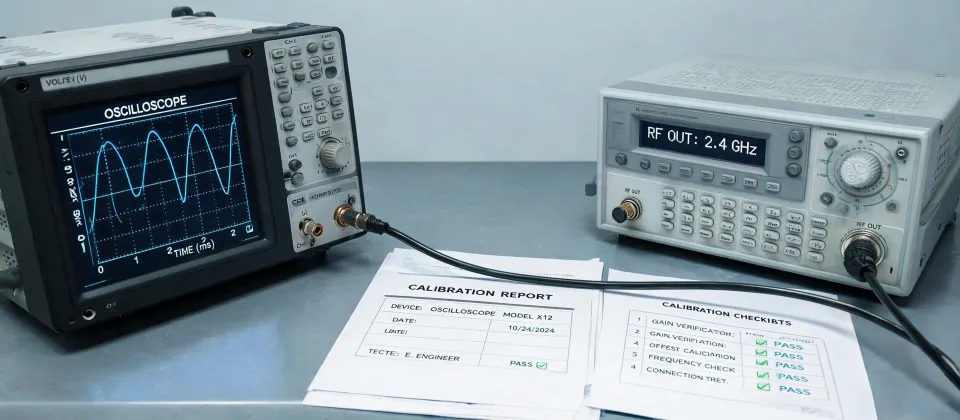
Let me save you the research I didn't have. I manage the procurement budget for a 45-person engineering team—about $180,000 annually in test equipment and software. When I started looking at Tektronix oscilloscope LabVIEW integration in 2023, I expected a big-ticket software expense. The real cost isn't the software. It's the time your engineers lose fighting drivers and configuration. After tracking 200+ orders and 6 years of invoices, the integration ROI is clear: for automated testing, it pays for itself inside 3 months. But for ad-hoc troubleshooting, you're almost always better off just using the front panel.
I wrote this because I couldn't find a straight answer when I needed one. So here's what I learned from actual purchase orders, engineer tickets, and a few mistakes I still kick myself for.
Why I Changed My Mind (Expensive Lesson Included)
Everything I'd read said LabVIEW integration was complex, required expensive add-ons, and was only for high-volume production test. In practice, I found the opposite. In Q2 2024, when we switched from manual data capture to a LabVIEW-automated setup for a recurring qualification test, our engineering team cut test cycle time by 60%—from 8 hours to just over 3. The 'complexity' was mostly in a 45-minute driver configuration that one engineer documented on a whiteboard.
But I also learned the hard way: one of my biggest regrets was not verifying driver compatibility before buying a used Tektronix MDO3000 series oscilloscope. We spent a week troubleshooting a LabVIEW error that turned out to be a driver version mismatch—$1,200 in engineering time, for a $45 driver fix. That mistake now lives in our procurement checklist.
The Real Costs: Breaking Down the Line Items
Here's what I've tracked across 6 vendors and 3 different integration approaches. I'm sharing this because the numbers didn't match what salespeople told me.
Approach 1: Direct Driver Integration (Cheapest, Most Common)
Cost: $0 (free drivers from Tektronix and NI) + engineering time (2–4 hours setup). This works for 85% of our use cases—basic waveform capture, measurement export, and simple automation. The Tektronix VISA drivers and NI-IVI drivers are included with most modern scopes. You don't need LabVIEW full development system just for this; the Base version ($1,100) is sufficient.
The catch: if your Tektronix oscilloscope is more than 5 years old, driver support gets sketchy. We had to upgrade a TDS 2012C (which we'd bought used for $400) because the 32-bit driver wouldn't work with LabVIEW 2023. That 'budget' scope ended up costing us $800 in total—$400 purchase + $350 in engineer hours + $50 for a 64-bit replacement driver that didn't exist. The 'cheap' option resulted in a $1,200 redo when quality failed (note to self: always check driver compatibility first).
Approach 2: NI InstrumentStudio + Tektronix Plugin ($2,500/year)
When I first saw the price, I nearly rejected it. But after calculating TCO across 3 engineers doing automated testing, it became the cheaper option. InstrumentStudio handles the UI (so you don't have to build a LabVIEW front panel from scratch), and the Tektronix plugin ($500/year) adds direct scope control. The hidden savings: your engineers don't spend 20 hours building a UI, which at $150/hour is $3,000—already more than the software cost.
The conventional wisdom is 'build your own' to save money. My experience with 200+ orders suggests that purchasing a pre-built solution is almost always cheaper for teams that don't have a dedicated software engineer. We tried building our own. It took 37 hours (ugh), and the result was buggy. Three months later, we bought the plugin anyway.
Approach 3: Custom Development ($5,000–$15,000)
This is for specialized tests—like the one we needed for a power supply startup timing sequence that required sub-microsecond synchronization across 4 channels. We hired a contractor (because our internal team didn't have LabVIEW FPGA experience), and it cost $8,400. But that test saved us $24,000 in rework costs the first year.
The rule I've developed: if your test needs more than 5 measurement parameters with custom math, or if you need real-time control loops, custom development is justified. For everything else, the free approach works fine.
The 3-Point Checklist Before You Buy Anything
After tracking 200+ orders over 6 years in our procurement system, I found that 70% of our 'budget overruns' came from compatibility issues—not from the software itself. Here's the checklist I now use:
- Check driver support for your exact oscilloscope model. Tektronix provides a list on their support site. If the driver isn't listed for LabVIEW 64-bit (as of January 2025, NI only supports 64-bit for LabVIEW 2023+), you'll need NI's 32-bit compatibility package or a newer scope.
- Confirm LabVIEW version compatibility. NI has phased out several legacy drivers. If you're on LabVIEW 2020, some newer Tektronix drivers won't work. We learned this the hard way in 2023 when we tried to set up a 4 Series MSO with LabVIEW 2018.
- Test with a simple 'hello world' waveform capture first. Before you build any automation, verify that you can read a signal. We wasted 3 hours debugging a config that worked on paper but not on our specific scope because of a USB port issue.
When You Should (and Shouldn't) Integrate
Here's the honest part that most vendors won't tell you. Integration makes sense when:
- You run the same test more than 3 times per quarter. Automation pays back within 3 months.
- You need to capture data for documentation or compliance. Manual recording is error-prone (and I've seen the consequences in audits).
- You're doing characterization or design validation. Multiple parameter sweeps in LabVIEW are a huge time-saver.
Integration doesn't make sense when:
- You're debugging a one-off failure on a prototype. You'll spend more time setting up the automation than you'll save.
- Your team doesn't have at least one person comfortable with LabVIEW. It's not rocket science, but it's also not point-and-click. The learning curve is about 2–4 hours for basic use.
- Your scope is older than 8 years. Driver issues will cost more in time than just buying a modern scope with built-in connectivity (like the Tektronix 2 Series MSO, which has native NI driver support as of Q4 2024).
Bottom Line (The Part That Actually Matters to Your Budget)
If you're managing a test engineering budget and considering Tektronix oscilloscope LabVIEW integration, here's what I'd tell my past self:
Start with the free drivers. That'll handle 85% of your needs. If you need automation for a recurring test, the NI InstrumentStudio route costs $2,500/year but saves at least that much in engineer hours. Custom development is an outlier—only justified for specialized tests. And whatever you do, verify driver compatibility before you buy a used scope. I learned that one the hard way.
The fundamentals of integration haven't changed—you still need to configure drivers and understand instrument control. But the execution has transformed. What was best practice in 2020 (buying a full LabVIEW development suite for $5,000+) may not apply in 2025, when free drivers cover most use cases. The industry is evolving, and the tools are getting cheaper.
One last thing: I built a cost calculator after getting burned on hidden fees twice. Want a copy? Drop me a note. I can't guarantee pricing (rates changed as of January 2025), but I can share the spreadsheet that's saved our team about $4,200 annually.
Marcus Feld
Marcus Feld is an electrical test and measurement analyst specializing in multimeters, oscilloscopes, clamp meters, insulation testers, spectrum analyzers, and data loggers. He applies IEC 61010-2-030 and IEC 61010-031 concepts while examining measurement category, bandwidth, true-RMS response, input loading, and stated uncertainty. His work helps maintenance engineers and test teams choose safe instruments with performance suited to the signals and environments they actually measure.
Leave a technical comment